How to Report Your Gemini Taxes

Gemini, a regulated and trusted exchange, offers different ways to earn crypto. However, when it comes to tax filing, the variety of transactions from spot trading to staking and rewards can create complex reporting challenges. Using the right tools, such as Blockstats, simplifies your crypto tax obligations seamlessly and accurately.
Quick summary:
|
Exchange/Platform |
Gemini |
|
Supported Method |
API Key |
|
Estimated time |
5-10 min |
|
Get Started |
This guide details how to do your Gemini taxes, from downloading the necessary documents to seamlessly integrating your data with Blockstats for accurate reporting of capital gains and income.
How to connect Gemini and Blockstats: Step-by-Step guide
API connection is the most efficient and error-free method for getting your full, real-time transaction history from Gemini into Blockstats. This method auto-syncs all past and future transactions.
Follow the step-by-step guide:
On Gemini: Generate API key
Step 1: Log in to Gemini.

Step 2: Click on your Profile icon in the top-right corner and select Settings.
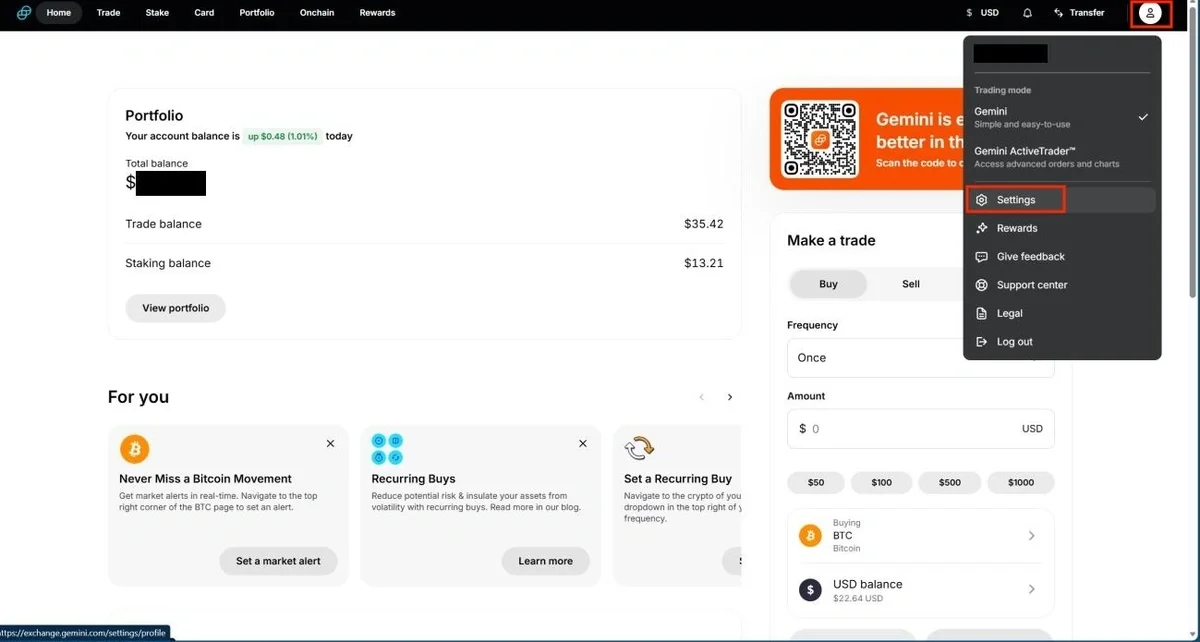
Step 3: Select API from the left side menu and click on Create API key.

Step 4: Under Scope, select Primary.
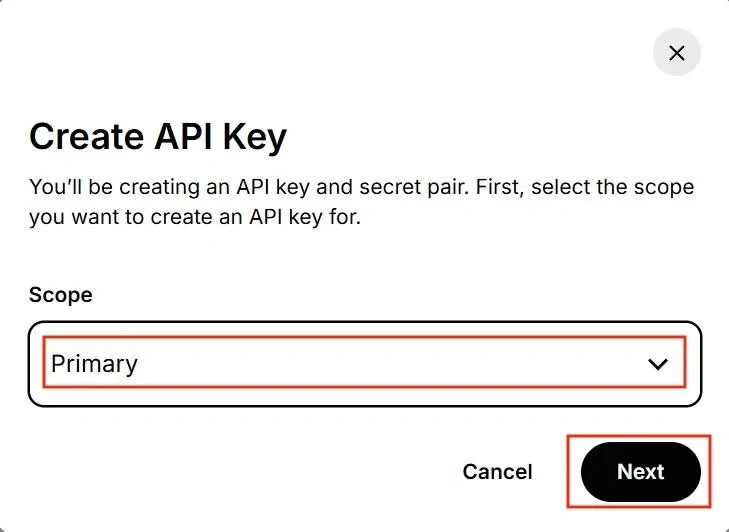
Step 5: Name your API key, "Blockstats". On the API key settings, choose Auditor and click on Create API key.
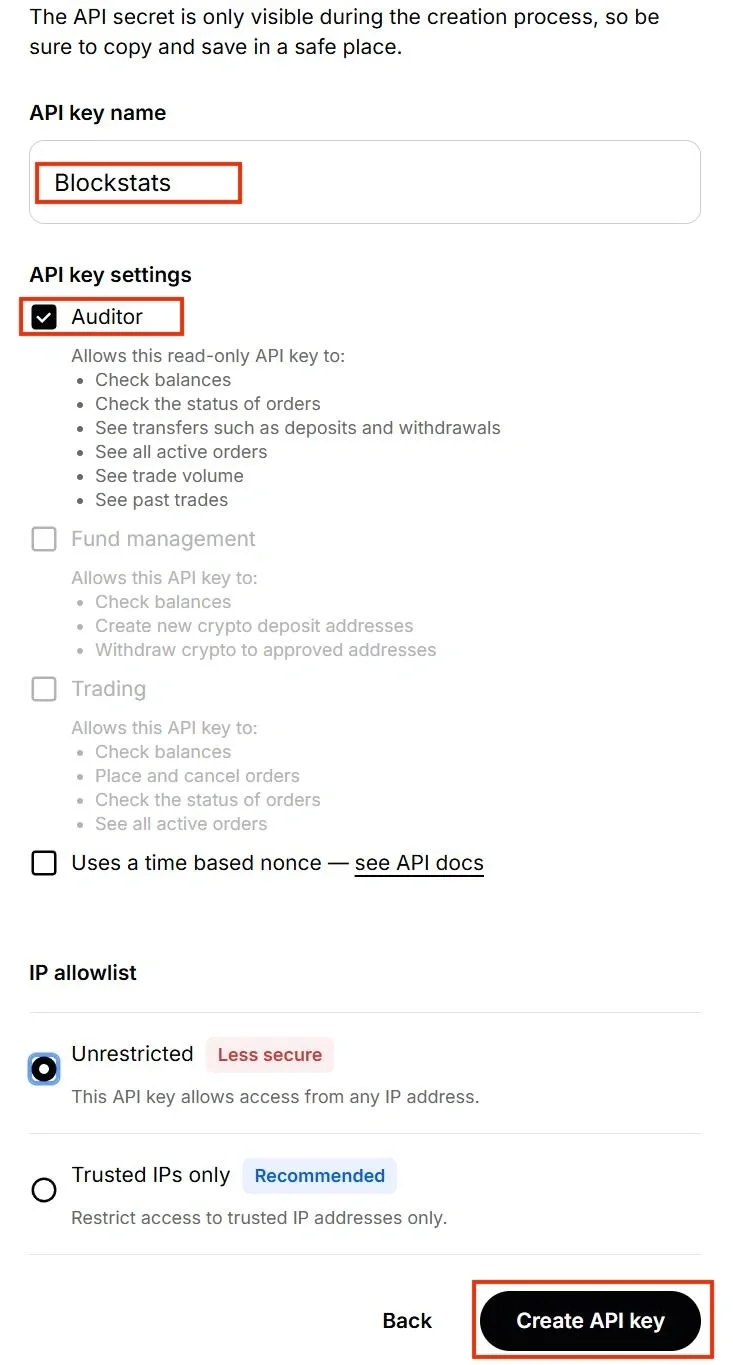
Step 6: Once generated, copy your API key and API secret.
On Blockstats: Connect Gemini to Blockstats
Step 1: Log in or sign up for Blockstats

Step 2: Go to the Wallets Page and then Add Wallet / Exchanges
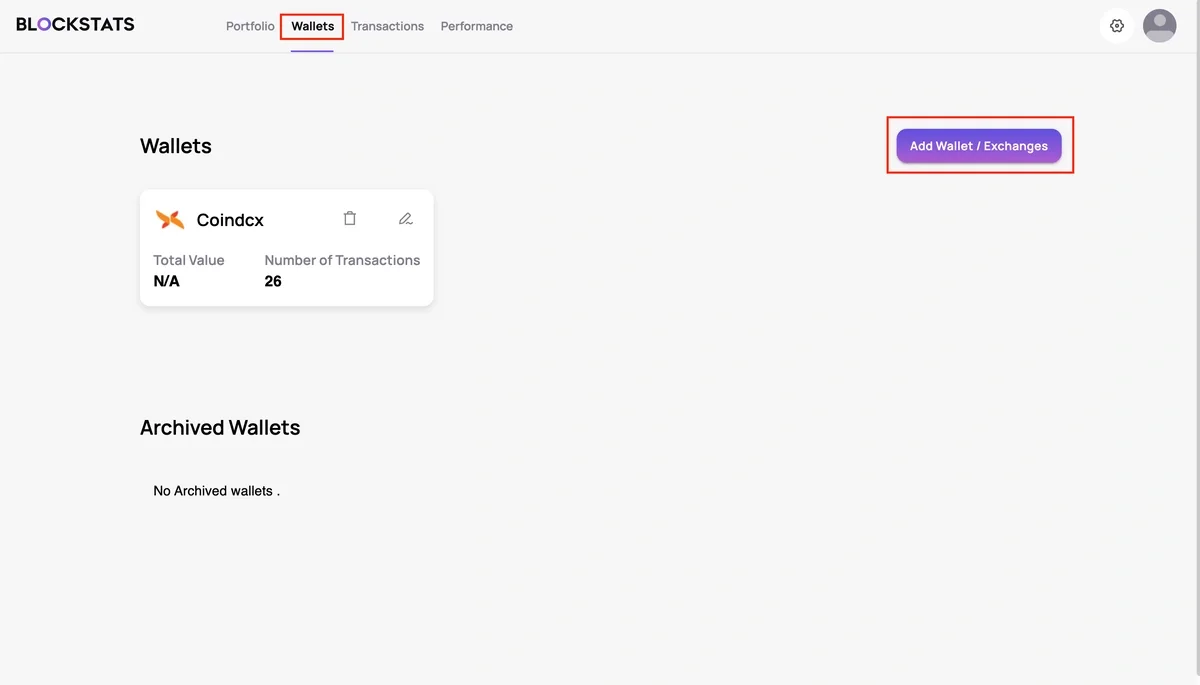
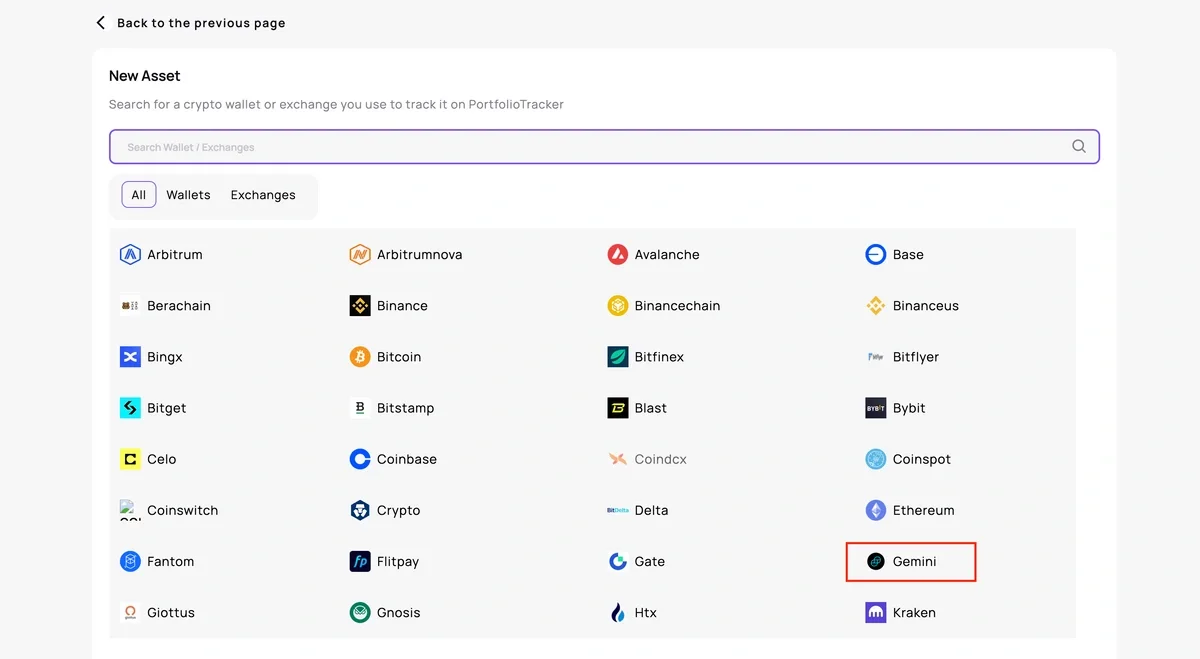
Step 3: Search and select the Gemini exchange.
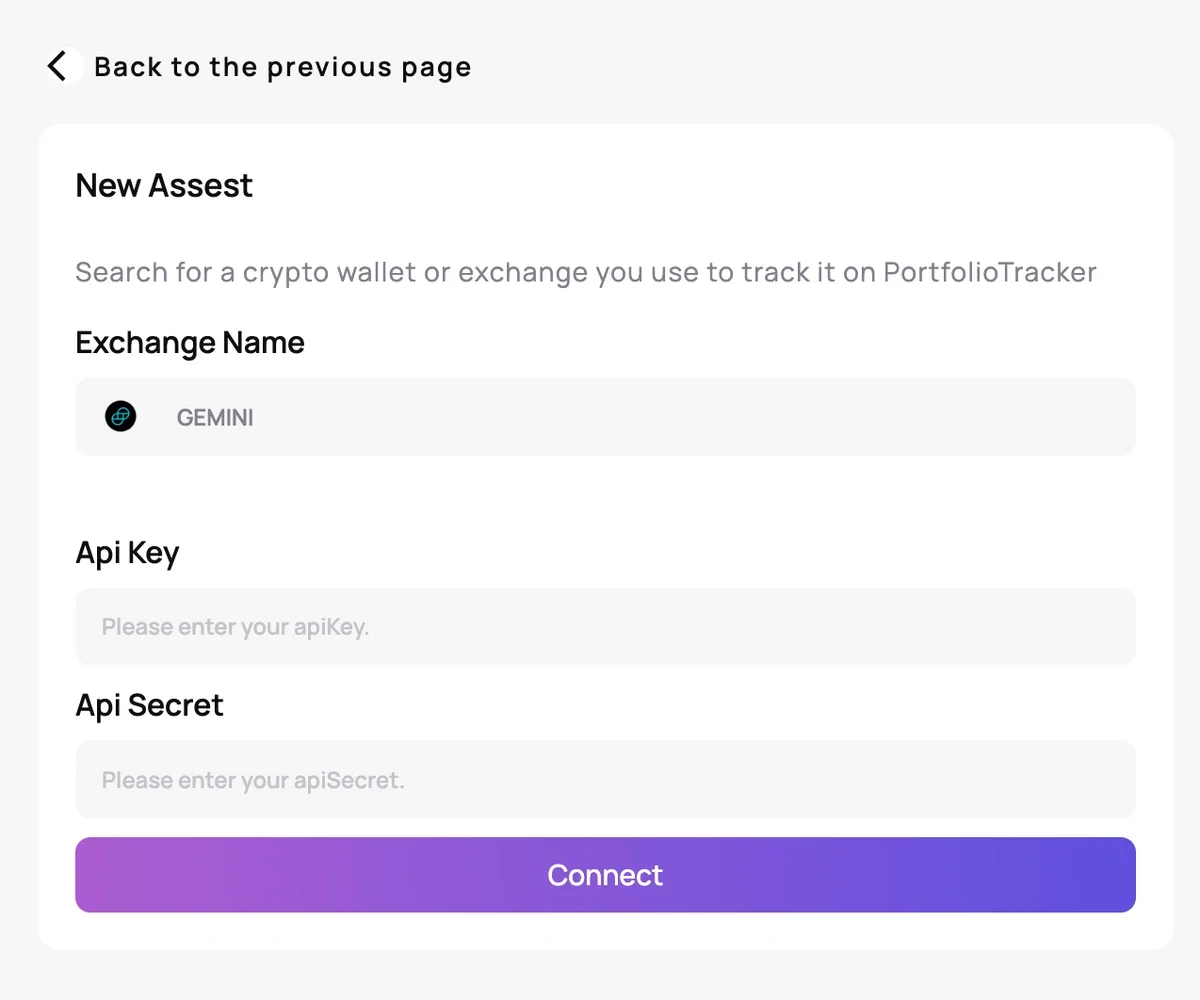
Step 4: Input the API Key & API Secret and click on the Connect button to link your Gemini account with Blockstats
Review and analyze your transactions
Once the Gemini integration is complete, you can:
-
Analyze trades, transfers, and cost basis data
-
Generate accurate tax reports.
-
Track your portfolio performance
-
Optimize your gains and losses
Blockstats automatically categorizes disposals, income, staking rewards, and other taxable events. It ensures your tax calculations are complete and compliant.
Read next: guide on how to calculate crypto taxes in the U.S.
How are Gemini transactions taxed?
Your Gemini taxes are determined by your country of residence. In the U.S., most crypto transactions fall into two main categories for taxation: Capital Gains Tax and Income Tax.
Capital Gains Tax
This applies when you dispose of a cryptocurrency asset, such as when you sell it for fiat, trade it for another crypto (crypto-to-crypto swap), or use it to purchase goods or services.
-
Taxable Event: Occurs where the Fair Market Value (FMV) at the time of the sale/trade is different from your cost basis.
-
Short-Term Gain/Loss: When you hold your assets one year or less are subject to your ordinary income tax rate, which is the highest tax bracket.
-
Long-Term Gain/Loss: When you hold assets for more than one year qualify for the more favorable long-term capital gains rates.
Income Tax
This applies when you receive crypto as a reward, staking income, mining reward, or airdrop.
-
Taxable Event: Crypto is considered income and is taxed based on its Fair Market Value in a fiat currency, e.g., USD, at the time it is received. This FMV is then included in your total taxable income.
Does Gemini report to the IRS?
Gemini reports user activities to global tax agencies like the IRS. These tax authorities are intensifying their efforts to combat crypto tax non-compliance and are working with exchanges to access Know Your Customer (KYC) data to verify reported crypto income.
How to do your Gemini taxes?
Every crypto activity, such as selling, swapping, or spending, is a taxable event. To calculate gains accurately, you must:
-
Have a complete record of all transactions
-
Track the cost basis for every asset
-
Identify income events
-
Calculate gains/losses for each disposal
Check out the free crypto tax calculator →
You have to calculate your income or capital gains from Gemini investments to report to your country's tax authority.
You can calculate your taxable transactions, net capital gain/loss, and crypto income manually. But this method is time-consuming and the chances of errors are high when you have multiple exchanges and wallets.
Alternatively, use a crypto tax calculator like Blockstats. It imports all your Gemini transaction data via API, calculates your taxable income, and generates the tax reports.
Blockstats tax calculator software centralizes all your crypto transactions from Gemini and other exchanges, simplifying crypto tax reporting.
Ready to simplify your tax calculation? Start calculating your Gemini taxes for free with Blockstats today!

Need help?
Having trouble connecting your Coinbase account to Blockstats?
-
Visit our Help Centre
-
Reach out to us on Telegram or X (Twitter)
-
Email us at support@blockstats.app
Frequently asked questions
Why aren't my Gemini tax documents accurate?
Gemini's document generation may be incomplete because it can only track transactions that take place directly on its platform.
The reasons can be that you transferred crypto into Gemini from an outside or you transferred assets out of Gemini to a different exchange or DeFi protocol. And due to this, Gemini won't know the original, crucial cost basis.
Does Gemini provide tax documents?
Yes, Gemini does provide tax documents for U.S. investors, including Form 1099-MISC. For others, Gemini provides a transaction history that you can use to calculate your Gemini taxes using a crypto tax calculator, Blockstats.
How do Gemini Earn taxes work?
Gemini Earn rewards, like staking, are taxed as additional income. It is based on the fair market value in fiat currency like USD at the moment you received the rewards into your Gemini account.
How do I get Gemini tax statement?
You can download tax statement form from Gemini and calculate your taxes manually. Or the best option to get Gemini tax documents is to connect to crypto tax software like Blockstats. You can connect Gemini to Blockstats via API. Blockstats crypto tax calculator will calculate your Gemini taxes for you and generate your Gemini tax documents within minutes.
What tax forms does Gemini send to users?
Gemini issues Form 1099-MISC for income above $600. Beginning in 2026, crypto exchanges operating in the U.S. will also begin sending Form 1099-DA